TexLive_VScode

Texlive in Vscode

Texlive

使用 TeX Live 官方安装脚本

1
wget https://mirror.ctan.org/systems/texlive/tlnet/install-tl-unx.tar.gz

解压

1
sudo zcat < install-tl-unx.tar.gz | sudo tar xf -

ls的结果
install-tl-20251209 install-tl-unx.tar.gz

1
cd install-tl-20251209

进入解压目录后执行安装脚本

1
sudo perl ./install-tl --no-interaction

….a few moments later

配置环境变量

1
2
vim ~/.zshrc
# 根据自己的shell来

加入以下内容(注意一下年份的匹配)

1
2
3
4
# LaTeX
export MANPATH=${MANPATH}:/usr/local/texlive/2025/texmf-dist/doc/man
export INFOPATH=${INFOPATH}:/usr/local/texlive/2025/texmf-dist/doc/info
export PATH=${PATH}:/usr/local/texlive/2025/bin/x86_64-linux

验证安装

1
2
tex --version
latex --version

再安装Perl模块(后边格式化代码时需要用到)

1
2
3
4
5
6
sudo apt update && sudo apt install cpanminus
sudo cpanm YAML::Tiny
sudo cpanm File::HomeDir
sudo cpanm Unicode::GCString
sudo cpanm Log::Log4perl
sudo cpanm Log::Dispatch

安装tex-fmt

用官方脚本装rustup

1
2
3
sudo apt update
sudo apt install -y curl build-essential pkg-config libssl-dev
curl --proto '=https' --tlsv1.2 -sSf https://sh.rustup.rs | sh -s -- -y

在当前终端把环境加载进来

1
source "$HOME/.cargo/env"

切换到stable并更新

1
2
rustup update stable
rustup default stable

配置crates镜像

1
2
3
4
5
6
7
8
9
mkdir -p "$HOME/.cargo"

cat > "$HOME/.cargo/config.toml" << 'EOF'
[source.crates-io]
replace-with = 'hustmirror'

[source.hustmirror]
registry = "sparse+https://mirrors.hust.edu.cn/crates.io-index/"
EOF

安装tex-fmt

1
cargo install tex-fmt

配置环境

1
2
echo 'export PATH="$HOME/.cargo/bin:$PATH"' >> ~/.zshrc
source ~/.zshrc

补充一些扩展

1
2
sudo apt update
sudo apt install texlive-xetex texlive-latex-recommended texlive-latex-extra texlive-fonts-recommended

VScode

下载以下两个插件

cahjian

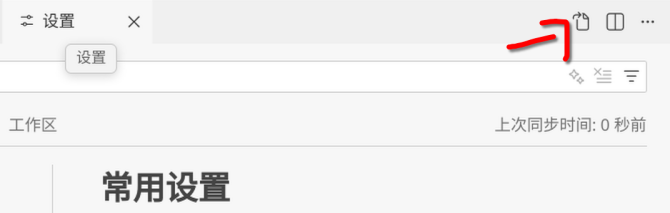
在setting的json中加入以下配置

1
2
3
4
5
6
7
8
9
10
11
12
13
14
15
16
17
18
19
20
21
22
23
24
25
26
27
28
29
30
31
32
33
34
35
36
37
38
39
40
41
42
43
44
45
46
47
48
49
50
51
52
53
54
55
56
57
58
59
60
61
62
63
64
65
66
67
68
69
70
71
72
73
74
75
76
77
78
79
80
81
82
83
84
85
86
87
88
89
90
91
92
93
94
95
96
97
98
99
100
101
102
103
104
105
106
107
108
109
110
111
112
113
114
115
116
117
118
119
120
121
122
123
124
125
126
127
128
129
130
131
"files.autoSave": "afterDelay", // 自动保存
"editor.formatOnPaste": true, // 粘贴后自动格式化
"editor.formatOnType": true, // 键入后自动格式化
"editor.formatOnSave": true, // 保存时自动格式化
// LaTeX
"latex-workshop.latex.recipes": [
{
"name": "xelatex",
"tools": [
"xelatex"
]
},
{
"name": "pdflatex",
"tools": [
"pdflatex"
]
},
{
"name": "latexmk",
"tools": [
"latexmk"
]
},
{
"name": "xelatex -> bibtex -> xelatex*2",
"tools": [
"xelatex",
"bibtex",
"xelatex",
"xelatex"
]
}
],
"latex-workshop.latex.tools": [
{
"name": "latexmk",
"command": "latexmk",
"args": [
"--shell-escape",
"-synctex=1",
"-interaction=nonstopmode",
"-file-line-error",
"-pdf",
"%DOC%"
]
},
{
"name": "xelatex",
"command": "xelatex",
"args": [
"--shell-escape",
"-synctex=1",
"-interaction=nonstopmode",
"-file-line-error",
"%DOC%"
]
},
{
"name": "pdflatex",
"command": "pdflatex",
"args": [
"--shell-escape",
"-synctex=1",
"-interaction=nonstopmode",
"-file-line-error",
"%DOC%"
]
},
{
"name": "bibtex",
"command": "bibtex",
"args": [
"%DOCFILE%"
]
}
],
"latex-workshop.latex.clean.fileTypes": [
"*.acn",
"*.acr",
"*.alg",
"*.aux",
"*.bbl",
"*.blg",
"*.fdb_latexmk",
"*.fls",
"*.glg",
"*.glo",
"*.gls",
"*.idx",
"*.ind",
"*.ist",
"*.lof",
"*.log",
"*.lot",
"*.nav",
"*.out",
"*.pdfsync",
"*.pre",
"*.rubbercache",
"*.snm",
"*.synctex",
"*.synctex(busy)",
"*.synctex.gz",
"*.synctex.gz(busy)",
"*.toc",
"*.vrb"
],
// 清理上述后缀名的文件
"latex-workshop.latex.clean.method": "glob",
// 语法检查
"latex.linter.enabled": false,
// tex文件浏览器,可选项为"none" "browser" "tab" "external"
"latex-workshop.view.pdf.viewer": "tab",
// 自动编译tex文件
"latex-workshop.latex.autoBuild.run": "onSave",
// 显示内容菜单:(1)编译文件;(2)定位游标
"latex-workshop.showContextMenu": true,
// 显示错误
"latex-workshop.message.error.show": true,
// 显示警告
"latex-workshop.message.warning.show": true,
// 从使用的包中自动补全命令和环境
"latex-workshop.intellisense.package.enabled": true,
// 清除辅助文件
"latex-workshop.latex.autoClean.run": "never",
// 设置vscode编译tex文档时的默认编译链
"latex-workshop.latex.recipe.default": "lastUsed",
// 用于反向同步的内部查看器的键绑定。ctrl/cmd + 点击(默认)或双击
"latex-workshop.view.pdf.internal.synctex.keybinding": "double-click"

随便在一个.tex文件中右键,然后点击使用格式化文档,然后选择Latex Workhop

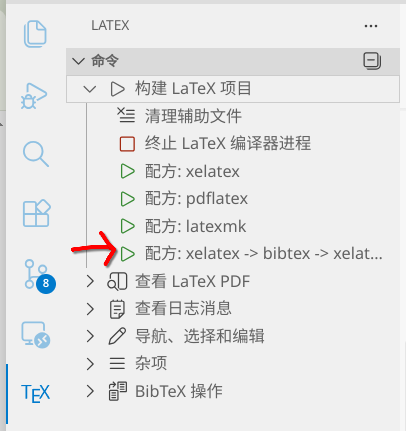
编译记得点击
参考资料

VScode config.

Texlive.